Navigation

Thursday, 17 May 2012

Search Core Results Web Part with Dynamic Date and User Profile Tokens

If you just want the goodies then you can get them here:
The Big Fat Disclaimer - This has not been thoroughly tested for a production environment. I have also removed references in my snippets below to caching and error handling to try and keep it brief. The downloadable version uses both caching and error handling, but it is still really just a proof of concept and you should TEST it before you deploy it! I take no responsibility if your production servers blow up!
I must have seen this requirement dozen of times on different projects, having search results which either:
  • Filter using a User Profile Property of the current user
  • Filter using a dynamic date range (e.g. using the “TODAY” token)
  • Specify the Sort-By (which is normally restricted to either “Relevance” or “Modified Date”
The requirement for functionality of this nature come up extremely frequently on Intranet projects. For example:
“Show News Articles from the past 7 days which filter based on the user’s location”
“Show events coming up in the next 3 months”
“Show discussions / wiki entries / blog posts which include the current user’s Ask Me About values”
Example
image
FixedQuery used in the Web Part:
Author:[UPP-PreferredName] AND Write:[TODAY-180]..[TODAY] AND ContentType:Event
Well .. on my current client project these very requirements came up .. so this time I decided to knock together the basics of the web part in my spare time and then “donate” it to the project… and this post describes how I built it, what goes on under the hood, and also includes both the source code as well as a downloadable WSP package with the working Web Part in it.

Step 1 – Extending the Search Core Results Web Part
So .. to get us started, lets kick off by creating our actual Web Part. I am going to be extending the Search CoreResultsWebPart (link to MSDN).
This is easy enough to achieve by simply creating a new Web Part in Visual Studio and inheriting from the CoreResultsWebPart class. This will make sure our web part gets all of the functionality and properties that the normal Search Results web part does without any additional effort.
   1:  [ToolboxItemAttribute(false)]
   2:  public class ExtendedSearchWebPart : CoreResultsWebPart
   3:  {
   4:   
   5:  }
That is the easy bit …

Step 2 – Overriding the Query and SortOrder
Now the next bit to tackle is how to override the actual query that gets executed. Well the best place to do this is to override the ConfigureDataSourceProperties method. This method gets called before the query is actually executed against the Search engine itself.

You can then leverage the CoreResultsWebPart.DataSource property (which is of type CoreResultsDataSource). This is what allows all of the magic to happen.

   1:  protected override void ConfigureDataSourceProperties()
   2:  {
   3:      // only perform actions when we are trying to show search results
   4:      // i.e. not when you're in Design Mode
   5:      if (this.ShowSearchResults)
   6:      {
   7:          // call the base web part method
   8:          base.ConfigureDataSourceProperties();
   9:   
  10:          // get the data source object
  11:          CoreResultsDatasource dataSource = this.DataSource as CoreResultsDatasource;
  12:   
  13:          // override the query being executed
  14:          dataSource.Query = "Author:\"Martin Hatch\"";
  15:   
  16:          // remove the original sort order
  17:          dataSource.SortOrder.Clear();
  18:          dataSource.SortOrder.Add("Title", Microsoft.Office.Server.Search.Query.SortDirection.Ascending);
  19:      }
  20:  }

So lets talk through the code above.

First off we want to make sure we are only executing our custom code when we are actually trying to retrieve search results. This is a fail-safe block as some instances this will be false (such as when you are editing the web part or if you are viewing the “Design” view in SharePoint Designer). We also need to call the base method (as you typically would when overriding a method call!).

Then things get interesting. Line 11 has us create our “CoreResultsDataSource” object from the local “DataSource” property. This has two properties which we are modifying:

Query (line 14) – This allows us to change or completely override the query which is being executed. This will be the entire query including the Fixed Query, Appended Query and whatever the user typed into their search box (if you are using this on a Search Results page). In my example above I am simply overriding the result so that it just searches for items created by “Martin Hatch” (me!)

SortOrder (lines 17 and 18) – This allows us to override the sort order, allowing us to select ANY indexed Search Property you want (I expect excluding rich text fields of course!). In my example, I am sorting by Title in Ascending order.
This can then be easily extended to provide custom Web Part properties to allow the Sort functionality to be specified by the page editor.

Step 3 – Making it re-usable Part 1 - Dynamic Date ranges
 So now that we can override the query easily we can move on to adding some of the good stuff. I decided to go with a relatively simple Token Replacement function using a simple [TODAY] token to represent the current date:
  • [TODAY] (todays date)
  • [TODAY+7] (today plus 7 days)
  • [TODAY-7] (today minus 7 days)
So .. how do we code this in? Well .. I am quite lazy and don’t really get on with regular expressions (if you are reading this and you are a RegEx guru.. by all means download the source code, refactor it and send it back, cheers!).

So I started off by creating a bunch of class level constants which I would use to recognise the tokens that we are looking for above:

private const string TODAY_PLACEHOLDER = "[TODAY]";
private const string TODAY_ADD_STARTSTRING = "[TODAY+";
private const string TODAY_SUBTRACT_STARTSTRING = "[TODAY-";
private const string TOKEN_ENDSTRING = "]";

The following code can then be swapped out for our ConfigureDataSourceProperties method.

   1:  protected override void ConfigureDataSourceProperties()
   2:  {
   3:      // only perform actions when we are trying to show search results
   4:      // i.e. not when you're in Design Mode
   5:      if (this.ShowSearchResults)
   6:      {
   7:          // call the base web part method
   8:          base.ConfigureDataSourceProperties();
   9:   
  10:          // get the data source object
  11:          CoreResultsDatasource dataSource = this.DataSource as CoreResultsDatasource;
  12:   
  13:          // get the current Fixed Query value from the web part
  14:          string strQuery = this.FixedQuery;
  15:   
  16:          // swap out the exact "today" date
  17:          if (strQuery.IndexOf(TODAY_PLACEHOLDER) != -1)
  18:          {
  19:              strQuery = strQuery.Replace(TODAY_PLACEHOLDER, DateTime.UtcNow.ToShortDateString());
  20:          }
  21:   
  22:          // perform all of the "Add Days" calculations
  23:          while (strQuery.IndexOf(TODAY_ADD_STARTSTRING) != -1)
  24:          {
  25:              strQuery = CalculateQueryDates(strQuery, TODAY_ADD_STARTSTRING, true);
  26:          }
  27:   
  28:          // perform all of the "Remove Days" calculations
  29:          while (strQuery.IndexOf(TODAY_SUBTRACT_STARTSTRING) != -1)
  30:          {
  31:              strQuery = CalculateQueryDates(strQuery, TODAY_SUBTRACT_STARTSTRING, false);
  32:          }
  33:   
  34:          // swap out the Fixed Query for our Calculated Query
  35:          dataSource.Query = dataSource.Query.Replace(this.FixedQuery, strQuery);
  36:      }
  37:  }

This then calls the CalculateQueryDates support method which I put together:
   1:  private static string CalculateQueryDates(string strQuery, string startStringToLookFor, bool AddDays)
   2:  {
   3:      try
   4:      {
   5:          // get the index of the first time this string appears
   6:          int firstIndex = strQuery.IndexOf(startStringToLookFor);
   7:   
   8:          // get the text which appears BEFORE this bit
   9:          string startString = strQuery.Substring(0, firstIndex);
  10:   
  11:          // get the text which appears AFTER this bit
  12:          string trailingString = strQuery.Substring(firstIndex);
  13:          int endIndex = trailingString.IndexOf(TOKEN_ENDSTRING);
  14:          if (endIndex + 1 == trailingString.Length)
  15:          {
  16:              // there is nothing else after this
  17:              trailingString = "";
  18:          }
  19:          else
  20:          {
  21:              trailingString = trailingString.Substring(endIndex +1);
  22:          }
  23:   
  24:          // find the number of days
  25:          string strDays = strQuery.Substring(firstIndex + startStringToLookFor.Length);
  26:          strDays = strDays.Substring(0, strDays.IndexOf(TOKEN_ENDSTRING));
  27:          int days = int.Parse(strDays);
  28:   
  29:          // re-construct the query afterwards
  30:          if (AddDays)
  31:          {
  32:              strQuery = startString + DateTime.UtcNow.AddDays(days).ToShortDateString() + trailingString;
  33:          }
  34:          else
  35:          {
  36:              // subtract days
  37:              strQuery = startString + DateTime.UtcNow.AddDays(0 - days).ToShortDateString() + trailingString;
  38:          }
  39:   
  40:          return strQuery;
  41:      }
  42:      catch (FormatException ex)
  43:      {
  44:          throw new FormatException("The format of the [TODAY] string is invalid", ex);
  45:      }
  46:      catch (ArgumentNullException ex)
  47:      {
  48:          throw new FormatException("The format of the [TODAY] string is invalid. Could not convert the days value to an integer.", ex);
  49:      }
  50:  }

So you should be able to see we are using simple String.IndexOf() method calls to find out if our Tokens are present.

If they are then we simply calculate the DateTime value based on the static DateTime.UtcNow property and use String.Replace() methods to swap out these into our query text.

When we are using [TODAY+X] or [TODAY-X] we simply use DateTime.UtcNow.AddDays(X) or DateTime.UtcNow.AddDays(0-X) and use the same String.Replace() method.

The search syntax is exactly the same as it was previously, and the Keyword Syntax is very powerful.
Example: Using [TODAY] Token query syntax

Write:[TODAY] – this will return all items that were modified today
Write>[TODAY-7] – this will return all items that were modified in the past week
Write:[TODAY-14]..[TODAY-7] – this will return all items that were modified between 2 weeks ago and 1 week ago

So we already have a powerful and reusable search component .. but there is more!

Step 4 – Making it re-usable Part 2 - Dynamic User Profile Properties
The next one is to allow us to pull in User Profile Properties so that we can start doing searches based on the current user’s profile values.
For this we needed to create new replacable Tokens, for which I decided to use:
  • [UPP-{User Profile Property Internal Name}]
  • [UPP-PreferredName] (swaps out for the users name)
  • [UPP-SPS-Responsibility] (swaps out for their “Ask Me About” values)
  • etc ..
So .. we add another class level constant (same as we did for our DateTime tokens)

private const string USER_PROFILE_PROP_STARTSTRING = "[UPP-";

We can then use this in our code, in exactly the way we did before (using String.IndexOf(), String.SubString() and String.Replace() methods).

So we add the following additional code to our ConfigureDataSourceProperties method;
   1:  if (dataSource.Query.IndexOf(USER_PROFILE_PROP_STARTSTRING) != -1 &&
   2:      UserProfileManager.IsAvailable(SPServiceContext.Current))
   3:  {
   4:      string strQuery = dataSource.Query;
   5:   
   6:      while (strQuery.IndexOf(USER_PROFILE_PROP_STARTSTRING) != -1)
   7:      {
   8:          strQuery = ReplaceUserProfilePropertyTokens(strQuery);
   9:      }
  10:   
  11:      if (strQuery != dataSource.Query)
  12:      {
  13:          dataSource.Query = strQuery;
  14:      }
  15:  }

This uses the additional method call ReplaceUserProfilePropertyTokens which is shown below:

   1:  private static string ReplaceUserProfilePropertyTokens(string strQuery)
   2:  {
   3:      // retrieve the current user's Profile
   4:      UserProfileManager upm = new UserProfileManager(SPServiceContext.Current);
   5:      UserProfile profile = upm.GetUserProfile(false);
   6:   
   7:      if (profile == null)
   8:      {
   9:          throw new ApplicationException("The current user does not have a User Profile");
  10:      }
  11:   
  12:      // extract the user profile property name from the token
  13:      int startIndex = strQuery.IndexOf(USER_PROFILE_PROP_STARTSTRING);
  14:      string strPropertyName = strQuery.Substring(startIndex + USER_PROFILE_PROP_STARTSTRING.Length);
  15:      strPropertyName = strPropertyName.Substring(0, strPropertyName.IndexOf(TOKEN_ENDSTRING));
  16:   
  17:      string strToReplace = strQuery.Substring(startIndex);
  18:      strToReplace = strToReplace.Substring(0, strToReplace.IndexOf(TOKEN_ENDSTRING) + 1);
  19:   
  20:      try
  21:      {
  22:          // get the value
  23:          UserProfileValueCollection propertyValue = profile[strPropertyName];
  24:          string strValues = String.Empty;
  25:   
  26:          foreach (object propValue in propertyValue)
  27:          {
  28:              if (propValue.ToString().IndexOf(" ") == -1)
  29:              {
  30:                  strValues += propValue.ToString() + " OR ";
  31:              }
  32:              else
  33:              {
  34:                  strValues += "\"" + propValue.ToString() + "\" OR ";
  35:              }
  36:          }
  37:   
  38:          if (strValues.Length > 0)
  39:          {
  40:              strValues = strValues.Substring(0, strValues.Length - 4);
  41:          }
  42:   
  43:          // swap the value out in the query
  44:          strQuery = strQuery.Replace(strToReplace, strValues);
  45:   
  46:      }
  47:      catch (ArgumentException ex)
  48:      {
  49:          throw new FormatException("The User Profile Property specified in your UPP token does not exist", ex);
  50:      }
  51:      return strQuery;
  52:  }

So there are a few things to point out here which might trip you up:
  • We are using the UserProfileManager.IsAvailable() method to find out if we have a user profile service application provisioned and assigned to the current Web Application.
  • At the moment this code throws an error if the current user doesn’t have a User Profile. You may want to handle this differently for your environment?
  • Handling of multi-value fields. At the moment all we do is take the string values and concatenate them with “OR” in the middle. So if you had “Value1; Value2” as your property value the Token replacement would put “Value1 OR Value2” as the search query.
As long as the content editors are aware of the behaviour this allows us to create quite complex queries.
Example if we now used the Fixed Query:
([UPP-SP-Responsibility]) AND Write:[TODAY-14]..[TODAY]
Then for a user who’s “Ask Me About” properties were “SharePoint” and “IT Administration” then the resulting Search Query would be:
(SharePoint OR “IT Administration”) AND Write:13/05/2012..17/05/2012
If another user comes along whose “Ask Me About” property was just set to “Marketing” then the resulting Search Query would be:
(Marketing) AND Write:13/05/2012..17/05/2012
This is without changing any of the web part properties, and allows us to drive dynamic content from a single web part to our entire user base.

Hopefully you can see that this is incredibly powerful and flexible.

Step 5 – Making it re-usable Part 3 – Controllable Sort By
The final step is to allow our content editors to control the “Sort By” functionality. The default OOTB webpart only allows us to sort by “Relevance” or “Last Modified”, which is fine when you are looking at general search results, but when you are building custom components (such as news, links or event feeds) you typically want to control the order by date or title or something a little more usable for the specific component.

So this bolt-in allows you to control the Sort By. First off we need to add some Web Part Properties so that the user can modify their values:

   1:  [Personalizable(PersonalizationScope.Shared)]
   2:  [WebBrowsable(true)]
   3:  [WebDescription("Sort by this managed property")]
   4:  [WebDisplayName("Managed Property")]
   5:  [Category("Sort Override")]
   6:  public string OrderByProperty { get; set; }
   7:   
   8:  [Personalizable(PersonalizationScope.Shared)]
   9:  [WebBrowsable(true)]
  10:  [WebDescription("Sort direction")]
  11:  [Category("Sort Override")]
  12:  public Microsoft.Office.Server.Search.Query.SortDirection SortDirection { get; set; }

This will provide the Web Part property editing functionality:
image

Once we have done that, we can add the following code to our ConfigureDataSourceProperties method (yes .. this method really is where all of the grunt work goes on in this web part!)
   1:  // if OrderByProperty is not set, use default behavior
   2:  if (!string.IsNullOrEmpty(OrderByProperty))
   3:  {
   4:      // change the sortorder
   5:      dataSource.SortOrder.Clear();
   6:      dataSource.SortOrder.Add(OrderByProperty, SortDirection);
   7:  }

And that is all there is to it.

Step 6 – Enjoy!
So congratulations if you made it this far. I know this was a long blog post but thought it was worth walking through it properly.

If you have any questions, feedback or questions then please get in touch using the comments, and here are links to the downloads (which are also referenced at the top of this blog post)
Some notes about the “final” version:
  • The code structure is slightly different because the DateTime [TODAY] queries are cached using Web Part Properties for better performance
  • the [TODAY] token is case sensitive!
  • There is an extra “Debug Mode” checkbox in the Web Part Properties which when enabled spits out the entire query being executed at the bottom of the search results.
  • Code contains an “Editor Part” .. this just clears out the Cache value when the web part properties are modified
Usage Summary:

Tokens you can use are:
  • [TODAY]
  • [TODAY+X] (add X days)
  • [TODAY-X] (remove X days)
  • [UPP-{Internal Name of User Profile Property}]
Example Usage
Sample user has:
Name: Martin Hatch
Ask Me About: SharePoint; Solution Architecture; Code
ContentType:Event AND ([UPP-SPS-Responsibility]) AND Write:[TODAY-7]..[TODAY]
becomes
ContentType:Event AND (SharePoint OR "Solution Architecture" OR Code) AND Write:12/05/2012..17/05/2012
Returns all events which were updated within the past week, and contain the current user's "Ask Me About" values.

Author:[UPP-PreferredName] IsDocument:1
becomes
Author:"Martin Hatch" IsDocument:1
Returns all documents written by the current user

Author:[UPP-PreferredName] Write>=[TODAY-14]
becomes
Author:"Martin Hatch" Write>=02/05/2012
Returns all content created by the current user and updated within the past 2 weeks


Tuesday, 3 April 2012

How to place custom HTML in the Office 365 public website footer

This is the second time I've come to do this, so thought I'd ping out a quick blog post showing how it works.

The requirement is simple, how to get a "proper" Copyright symbol in the footer of a public website? (although you can also use this technique for other methods too .. such as adding analytics tracking codes and JavaScript to your site!)

The Problem - OOTB dialog does now allow HTML editing
When you are using the standard Office 365 public website editor, you are stuck with the standard dialogs for header / footer / theme and such.

The "footer" dialog is woefully lacking, and doesn't even allow basic HTML editing


This unfortunately leaves you with an extremely basic footer text, missing items which you would normally include (such as the Copyright symbol ©).


SharePoint Designer to the rescue ..

Yes .. I admit I didn't really expect to hear myself saying this either, but it does seem like SharePoint designer is the answer here.

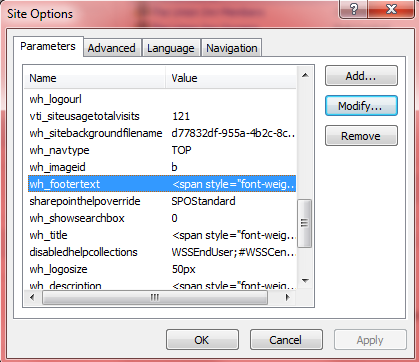
The actually footer text values are stored in the SPWeb.Properties bag, in a specific property called wh_footertext.

(in fact .. if you look through the properties there are all sorts of values to play about with, including the logo URL, Footer links, site usage information, and a few HTML placeholders for things like Left Nav and the Site Map .. well worth a look!).

So, when you open up SharePoint Designer you can actually get to the Properties values by using the Site Options link in the Ribbon;


This opens up a simple dialog picker where you can modify any of the available properties;


And when you edit the wh_footertext then you get complete control over the entire footer (including, interestingly enough, the wrapping SPAN tags as well!)


Having made this simple change we simply refresh our webpage and all is done :)


Another simple but quick one. Hope you find it useful!


Looking back on "going native" - why I decided to think inside the Microsoft box

I've been thinking about this quite a lot recently, with the rather spurious Google privacy policies, and new versions of Chrome / FireFox / Opera popping up every few weeks.. I am looking back on over 12 months of "going native". By this I mean I have been using nothing but Microsoft technologies for all my core working functions;
  • Internet Explorer (no add-ins)
  • Bing Search
  • No Visual Studio extensions
  • Windows Phone 7
And so far .. I am absolutely loving it!

It all started with Bing and Windows Phone 7 ...

This really started back in early 2011 when Bing was actually starting to come good. Their mapping service was getting some good reviews, I knew from various Microsoft events that their Search engine had undergone a pretty thorough overhaul from its early days, and I had also recently gotten myself a new (at the time) Windows Phone 7.

The default search engine for this was Bing, and I admit .. I was a very hardened Google search kinda person. I had it as my home page, I used iGoogle, and I had been doing so since its early days in 1999 (when I started at University). So I was more than a little irked to find that in Windows Phone 7 I couldn't actually change the default search provider (like I had done with each new install of FireFox .. my default browser at the time).

This made me think;
Why do I use Google Search? Is it because it is better, or is it just because it is "what I've always done"?
So .. instead of installing one of the half-dozen (slightly dodgy looking) free Google apps on the marketplace, I decided to just start using Bing on a daily basis to see if I could change my habits.
Disclaimer .. I will admit I also have ulterior motives for this. I have spent the past 8 years working for Microsoft Partner firms and (as you can tell from my blog) my day-to-day working life is very heavily Microsoft influenced ... so following the "all in" mantra I wanted to see if I could practice what I preach and basically use nothing but Microsoft for a while to see if there was anything lacking.

So anyway .. I started using Bing search .. and you know what? It is actually pretty damned good! I am a pretty heavy user of search (I must use browser based searching at least 10 times every day .. and on heavy days I can be looking for stuff several times an hour). This can be anything from searching for blog posts and technical articles, to using it for a quick-reference for MSDN and finding class library references when coding.

In a six month period I only felt the need to return to Google search twice, and both times I couldn't find what I was looking for on Google either!

So I ended up pretty much converted overnight. I even started correcting people when they were suggesting a search; they said "Google it" and I said "no, Bing it instead!" (muscle memory is by far the hardest part of change!).

... what came before, is, and shall be again ... moving to Internet Explorer ...

So next up was the internet browser.. like I said, I was a big FireFox fan and I used to regularly install a whole raft of plug-ins and addons (including custom themes .. the whole works .. yeh, a proper geek-job!). Before that I was (in my youthful ignorance at school) a user of IE (back in the days of IE5, IE5.5 and IE6) .. so it was interesting that this has ended up going full-circle!

For those who don't know me very well my job also involves a fair bit of client-site work, and quite a lot of the time they will give me a corporate workstation with their own corporate build (which by default was almost always IE8 and IE9). I was also in the habit of re-installing / optimising my own personal laptop as well and was getting pretty fed up of having to install a new browser and a bunch of add-ons every time I setup a new machine (which including all of the client workstations and virtual machines I was given .. this was almost every 2 weeks at one point!).

So .. I thought .. why not give Internet Explorer another go? IE9 had come out shortly after I made the switch to Bing search and it was getting some good reviews ... more minimalistic design, cross-application tabs, a vastly faster javascript engine and much much better HTML and CSS support than previous versions.

So I actually un-installed FireFox (to force myself to use IE). This actually worked out quite well because the locked-down corporate workstations were all using IE as well (like I said .. I work in the Microsoft space so they were all usually standard Windows build machines).

A few weeks of painful "argh .. where has that button gone?" moments went past .. and then, I started to realise with a bit of shock, I actually quite liked it!

My RSS driven drop-down favourites worked just as well as they did in FireFox, the pop-up blocker, InPrivate Browsing, page compatibility mode and built in DOM inspector were doing the job for me functionally, and the search (which defaults to Bing .. which was another win from my earlier switch :))

Here I am 12 months later, rocking on with IE9 and looking forward to getting IE10 on my machine. The browser still seems really quick (although I'm sure having a fast laptop with tonnes of RAM helps!) and honestly I've found that pretty much every single website I visit works perfectly well, first time and every time!

... if you can build it, then you don't need them to come .. Visual Studio ...

Well .. by this time I was well on my way. I was now using exlusively Internet Explorer for my day-to-day work, my search engine was Bing, I was using Bing Maps (on both desktop and my phone) and life was pretty good. Every single new laptop or server I logged onto was already setup exactly how I wanted it to be (i.e. pretty much the default settings).

So I started looking at what else I was using. Visual Studio was a big one, which typically gets bolted on with all sorts of "productivity enhancement" tools (such as Re-Sharper typically being one of my default addins for a couple of years). So I wanted to try coding without this installed!

Now ... I have to admit, I've never been totally sold on the value of Re-Sharper, but perhaps that harks back to the days of building SharePoint 2003 solutions pretty much in NotePad, creating DDF files and using batch scripts with MakeCAB commands to generate the WSP files. One of my internal concerns about everything being automated for you is that you tend to forget how things work, and why you are doing them in a certain way (but hey .. faster, more consistent development is good for the industry in other ways too).

Again ... I found I was suprised by what you can actually achieve out of the box (especially with Visual Studio 2010). I perhaps found I was relying on add-on tools to do things that had been added to the core product over time, but I never realised (such as Ctrl-M, R to refactor code into a method). Sure .. there are a few small things I miss (like removing redundant "USING" statements in C#) but generally speaking 99% of my coding life I can achieve just as fast but using OOTB tools.

Again, when I move between client-site development teams this has been extremely useful. My Muscle memory has now been trained to Visual Studio 2010 in its "native" mode .. so I don't have any of those "oops, I pressed the wrong key" moments in my first few weeks of development, which has been really nice :)

.. finding the time to think inside the box ..

So .. all in all a great experience, and I have to admit I feel really good that I can honestly champion Microsoft technology to my clients having been "dog-fooding" the self-same technology myself.

I now also use SkyDrive (with LiveMesh) and Office 365 for all my for my cloud needs (one for personal, one for business) although I'll be writing another blog post about that another time.

I have found myself more and more looking at the other tools I use and finding out what "off the shelf" solutions I can use instead ... I have started using Microsoft OneNote more and more (and my favourite function is Win+S to open up a "screen clipping" tool so you can copy select parts of the screen into the clipboard .. it may seem basic but I used to have another 3rd party tool to do that kind of thing).

Do I still have other kit installed? Sure I do .. I still have Chrome, Opera, Safari and FireFox (hey .. I do web development, it would be criminal if I ignored them completely!) and I do occasionally go back to Google search, or Yahoo / Ask just to find out if they are doing things differently.

But for now .. life is good ... life is OOTB!

Monday, 5 March 2012

SharePoint Rockstar - a Nickelback Parody

This was inspired by a short twitter conversation with @cimares, @ToddKlindt and @usher about the #SharePoint #Rockstar and the potential for a rip off parody of the Nickelback song "Rockstar"..

Basically I felt like finishing the song off .. so without further ado .. to the tune of Nickelback's "Rockstar" I give you ..

SharePoint Rockstar..

I’m through with coding in line
And unghosting everything
I’m using SharePoint Designer
And I’m never gonna win
The solution didn’t turn out
Quite the way I want it to be
(Tell me what you want)

I want a brand new blog,
with the comments all filled
And a server room I can play baseball in
And a laptop full of software that
I got for free
(So what you need?)

I’ll need a Skype account that’s got no limit
A huge laptop with an SSD in it
Gonna get my own
parking space at TVP
(Been there, done that)

I want to get an invite to a conference pass
My own seat up in Business Class,
Somewhere between Spence and
Steve Smith is fine for me
(So how you gonna do it?)

I’m gonna tweet like made, adopt SharePoint zen
I’ll use the hashtag  #SP2010

[Chorus:]
‘Cause we all just wanna be big rockstars
Fixing errors in the logs that are just bizarre
I code so much I got RSI, but my User Profile Service gonna start first time!
And we’ll hang out in the SharePint bar
In the VIP with the SharePoint stars
Every ITPro and coders
gonna wind up there
With our free vendor shirts
That we just won’t wear
Hey I wanna be a SharePoint rockstar

Wanna be great like Eric Schupps but without the hat
Pass every single exam I’ve sat
Talk at the User Group
So I can get my drinks for free
(I’ll have a SharePint on the house!)

I’m gonna get the latest version
Setup on my VM
Get a free Ultimate key to MSDN
Gonna date a designer
who builds all my sites for free
(so how you gonna do it?)

I’m gonna tweet like mad, adopt SharePoint zen
I’ll use the hashtag  #SP2010

[Chorus:]
‘Cause we all just wanna be big rockstars
Fixing errors in the logs that are just bizarre
I code so much I got RSI, but my User Profile Service gonna start first time!
And we’ll hang out in the SharePint bar
In the VIP with the SharePoint stars
Every ITPro and coders
gonna wind up there
With our free vendor shirts
That we just won’t wear

And we’ll hang out in the speaker rooms
With all the MVPs and whoever is cool
I’ll build you anything with cascading styles
Everybody’s got a contractor on speed dial

Hey I wanna be a SharePoint rockstar

I’ll annoy QA by writing messy code
I’ll deploy my solutions in debug mode

I’ll get an off-shore team to write all night long
Then I’ll code it again because they’ll get it all wrong ..

[Chorus:]
‘Cause we all just wanna be big rockstars
Fixing errors in the logs that are just bizarre
I code so much I got RSI, but my User Profile Service gonna start first time!
And we’ll hang out in the SharePint bar
In the VIP with the SharePoint stars
Every ITPro and coders
gonna wind up there
With our free vendor shirts
That we just won’t wear

And we’ll hang out in the speaker rooms
With all the MVPs and whoever is cool
I’ll build you anything with cascading styles
Everybody’s got a contractor on speed dial

Hey I wanna be a SharePoint rockstar

Monday, 20 February 2012

Hey check out my new brick .. it looks just like a Nokia Lumia 800!

Today has not been a good day as I am now holding a completely useless "bricked" Lumia 800 .. but first let us wind back 3 weeks when my wife and I became proud owners of brand spanking new Nokia Lumia 800 phones running Windows Phone 7.5 ("Mango").

The new Nokia Lumia 800, running Windows Phone 7.5
Yep .. thats right .. we both got the same phone (she got the blue / cyan one .. I got the black one). You might think this a little sad (his and hers?) but honestly I find providing "tech support" far easier when we both have the same handset ;)

Anyway .. so we left the store, brand new phones in hand. They were very shiny, they looked slick, they started up quickly and seemed like honestly damned good phones.

We both got our email setup quickly (both Hotmail and Exchange accounts) and while my better half was merrily catching up on Facebook, I was very impressed with the SharePoint integration and how it automatically configured the Office Hub when it realised my email account was on Office 365! Very slick...

What Battery Problems?
Now I had heard that there were battery problems, but a recent software fix seemed to sort this out. One of the very first things I did (with both phones) was plug them into Zune, get them synced up and install the latest software fix (so my phone is currently fully patched and running the latest version!).

My wife's phone was having an issue with battery life before the update (it dying after 12-15 hours) but this was well documented, and after we updated the phone everything seemed to be fine ..

in short .. life in the Hatch household's mobile world was good ..

so now lets wind on to last week ..

What do you mean you can't turn it on ??
The first sign of problems was actually on my wife's phone (the blue/cyan one for those of you paying attention!). She was coming to meet me in London after work and the usual agreement of "I'll send you a text message when I'm outside your office" .. now the work day came, went and started slipping when I finally got a phone call from a pay-phone ... my wife was frantic as her phone had turned itself off despite still having over 20% battery life remaining! and it would not turn on!

Eventually I managed to meet up (strangely difficult without constant-on communication .. how on earth did I manage before I had a mobile phone?) and I looked at the handset itself... I tried 6 times in a row to turn the phone on and kept trying periodically for another 10-15 minutes ... I tried it again one final time and it worked, buzzing into life like a defibrillator had just kicked it into life. I quickly logged in, went to the Settings and checked the "Battery Saver" and it said it had 23% battery with approximately 15 hours remaining .... how bizarre ...We didn't see the problem happen since (and we both use our phones quite a lot every single day) so I put it behind me and we kind of forgot about it ..

now lets wind on to today (or more accurately last night)

Congratulations! Its a Brick!
I was heading over to a friend's house .. now this particular friend has been having problems with his Android phone and was quite keen on looking at the latest flagship Windows Phone .. so I took mine out of my pocket and tried to unlock it ... nothing .. dead as a doornail.

I tried to turn it on .. nothing ... held down the power button for up to 30 seconds ... tried again .. still nothing. So then I thought .. "maybe the battery is dead??". So I borrowed his micro-USB charger and left it to charge for 20 minutes. I then came back .. still won't power on.

So now I am panicking .. I took my precious new phone home and left it on charge for 9 hours overnight but this morning? Nothing .. no life .. completely dead.

Now I have since attempted various tricks on the internet from various forums:
  • Some people said it can't recharge if the battery hits 0% so heat the phone up and THEN try plugging it in .. this didn't work!
  • Tried holding down the power button for 8 seconds (apparently this resets the power-cycle) .. that didn't work
  • Tried unplugging and re-plugging the charging cable several times in a row while either holding down or randomly trying the power button ... didn't work
  • Tried a "hardware reset" by holding down the Volume Down, Camera and Power buttons ... that didn't work either!
So what now? My new shiny Lumia 800 is officially bricked!

I will be taking this back to the Orange store that I got it from ASAP .. I expect them to replace it .. but I have already seen evidence of this strange issue on my wife's phone last week .. so will this keep happening?

I really hope this is a software bug (so they can release an update) .. or perhaps a really rare glitch in hardware that just HAPPENS to have struck both me and my other half at the same time.

If any of you have experienced the same problem please let me know in the comments... Otherwise I'll see what happens when I get mine replaced / repaired and let you all know!

Thursday, 16 February 2012

21 Things I would do if I was an evil SharePoint overlord!

  1. All site collections will be deployed with site collection quotas allowing only 1 sandbox resource point
  2. The Site collection storage limit warning will be set at 1mb for My Sites with the entire company set as the warning email address
  3. I will insist that all site collections are created with their own host name URL. This will force any BI tools to require new SPNs for Kerberos configuration
  4. Ideally, each of these sites will have their own Web Application, and their own application pool, which will force them to buy new servers so keeping within the "10 application pools per server" guidelines which I will give them
  5. Every web application will have a custom service connection proxy group, so every time a new service application is created they will have to manually add it to each web application's custom proxy group
  6. All databases will be created through Powershell by concatenating random GUIDS (in addition to the ones SharePoint creates automatically)
  7. While developing, all of my API classes will be public with internal constructors
  8. All default site content will be deployed using HTML encoded XML, with multiple unecessary nested divs and empty spans.
  9. Feature Stapling will be banned .. as will Content Types
  10. I will configure all Diagnostics Log categories to "Verbose", disable flood protection and only keep log files for 1 day, making it a painful and arduous task to troubleshoot issues.
  11. Each SharePoint server will install to a non-default directory. This will be different for each server to keep the admin team on their toes.
  12. I will include a script which adds expiration policies to the "Document" content type in each site collection .. this will bombard the author with emails if they don't update their documents every 2 weeks, therefore keeping the content fresh
  13. SharePoint Designer will be unblocked, and its usage will be encouraged!
  14. The User Profile database will be configured to crawl every 2 minutes .. keeping the process continually running so no-one can modify the connections
  15. For contrast, the default Search content source will only index User Profile content every 56 hours .. so no-one can be exactly sure when it will be updated
  16. Each web application will be given different URLs for each department. IIS bindings will be put in place, but no alternate access mappings so they cannot share links or embedded urls with each other.
  17. The default zone will be set as Read Only via a policy so that items found in search results cannot be edited. there will be an alternate URL, but access mappings won't exist so users will have to swap it out manually
  18. The reply-to email address for all notificatiosn will be set as the company switchboard.
  19. All custom web parts will, where possible, be deployed as Farm Features .. so that everyone can see them, but will only be configured to work on specific sites.
  20. We will not have specific servers .. all farm servers will run all of the services. I will convince the IT team that this makes their lives easier as they only need 1 server spec when buying new machines.
  21. I will set the qouta of the my site host to 10MB so that only the first few users will be able to upload their profile picture.

Suggestions are welcome in the comments :)

Monday, 6 February 2012

I'm speaking at the International SharePoint Conference

Yep, its that time again and one of the biggest, most innovative and best SharePoint conferences is back for another year.

This conference has been through a few iterations in its time going by the names "SharePoint Best Practice Conference" and "SharePoint Evolution Conference" but they have now dropped those for a more simplified "International SharePoint Conference".

The conference is held in London, Westminster  (April 23rd - 25th) and this year promises to be an absolute cracker! The best thing about this year's conference is that they are doing "Solution" tracks, following a single thread from concept all the way through. This will involve all angles from IT Pro, Developer, Information Worker .. and really helps to tie together all those pieces that make up a single complex problem. For the first time you won't have a session saying "well .. this next bit is really important but we don't have time .." at this conference they will make the time, whether they need 3, 4 or even 6 sessions to get through the whole problem.

One of the best quotes comes from the organiser, Steve Smith (@SteveSmithCK):
As you can see it is very exciting and different unlike any other agenda attempted by a SharePoint conference.

For example: A total of 10 solutions over the three Information Worker tracks based on different real world scenario's with one solution alone covering 7 sessions to completion and speakers working together over the sessions to build the solution.

A lot of people have asked me how I have been able to build such an agenda. The answer is pretty straight forward. unlike most SharePoint conferences that are run by conference events companies Combined Knowledge actually understands SharePoint and we know the people out there who are specialists in those subject areas to come and talk on it, we have been working with SharePoint for 10 years and over those years I have had the privilege to meet some very smart people in the SharePoint world and therefore I personally build the agenda and along with some specialist from each track we are working with the speakers to make it happen.

I also look at the current maturity model of the product and what type of content people are searching for and then finding the best way to deliver that content in a format that people will enjoy watching and listening to as well as learn from it. In my opinion that is the only way you can truly deliver a conference that provides the attendees with the knowledge needed to take away and use in the real world.
The Agenda and Speaker List looks amazing .. if you haven't bought a ticket yet then you are most definately missing out!

I'm speaking too ...

And this year I have my own slot talking about Real World: Building a global Business Intelligence Extranet, from End Users to Support and Operations.
(CS701).

This is basically a combination of technical and logistical problem solving involved at my main project over the past 12 months delivering a global Business Intelligence extranet in SharePoint 2010.

The main thing here is that we are not just talking about the technical problems (like multiple languages and scalability) but more about the operations and admin side of things, like how do you track and manage security for thousands of databases and thousands of users at the same time?

There is also the problem of processing and updating tens of thousands of OLAP cubes every month, and add to this other third party BI tools (which sit alongside Excel Services, PerformancePoint Services and Reporting Services) and you have a big challenge on your hands.

Well, I certainly hope to see you there. Even if you don't make to my session (there are loads of great session tracks on all three days) then grab me during one of the breaks, or one of the SharePints afterwards and I'll be happy to chat.

Friday, 3 February 2012

DNS Records required to use Lync Online (Office 365) with a Vanity Domain

Note - this only applies if you have your own "vanity domain" such as companyname.com. This does not apply if you are using the Microsoft Online domains "onmicrosoft.com"

I've seen quite a few people asking for help with this, and struggled a little bit when I first set this up myself, so I thought I would post the DNS entries that are required to get Lync Online working.

These are generic DNS records, so it doesn't matter what server / service you have.

Now, first off you will need to get yourself a relatively advanced DNS Management Service. I personally use the most excellent Zone Edit (www.zoneedit.com). This is completely free and allows you a very high level of control over what records you can create. I have found with some of the other DNS management sites that sometimes you cannot create some of the required records (such as SRV records).
DNS Records described by Office 365 Portal

There is 1 SRV record and 2 CNAME records that you need to create.

You can find these in your Office 365 Portal under "Domains" and "verify DNS Settings". Below is the screenshot from my own Portal Site for my domain "hatchsolutions.co.uk".


The thing to note is that it gives you the full host-name entry for each of the records you need to create. When you actually create these (depending on your DNS management tool) you will probably only need the prefix for the host name.

So the three records you need to create are:

  • _sipfederationtls
    • Type: SRV
    • Port: 5061
    • Weight: 1
    • Priority: 100
    • TTL: 3600 (seconds)
    • Target: sipfed.online.lync.com
  • sip
    • Type: CNAME
    • TTL: 3600 (seconds)
    • Host-Name: sipdir.online.lync.com
  • lyncdiscover
    • Type: CNAME
    • TTL: 3600 (seconds)
    • Host-Name: webdir.online.lync.com
So you can see above, I have only used the initial part of the full hostname. Having a CNAME record called "sip" in my managed domain "hatchsolutions.co.uk" gives me the fully-qualified address "sip.hatchsolutions.co.uk".

But ... that's not all ...

I also found in my environment that one more SRV record was required, which for some reason was missing from the official instructions. I honestly can't remember where I found this (credit goes to someone wonderful person on the blogosphere somewhere) but the details are below:
  • _sip._tls
    • Type: SRV
    • Port: 443
    • Weight: 1
    • Priority: 100
    • TTL: 3600 (seconds)
    • Target: sipdir.online.lync.com
I found that once that is also in place, everything started working. You may need to wait for 24 hours (for this to propogate round the world's DNS servers) and you should be good to go! (I think I had to wait a good few hours before mine started working .. so please be patient!)


Tuesday, 15 November 2011

My top missing features in Windows Phone 7 - SharePoint Contacts, Tasks and Calendars

I have been an advocate of Windows Phone 7 (WP7) for quite some time now, especially having owned and used a WP7 device for over 9 months now. However, there are some things that I really do find lacking.

Microsoft have been pushing the SharePoint integration with WP7 quite hard, especially with the recent announcements for SharePoint Online to support BCS (which basically opens up the door to have WCF calls made from your Office 365 SharePoint Online site, so you could do two-way WP7 applications which integrate tightly with your SharePoint applications!).

However, there are some features which I think would really concrete this device for small businesses as THE device to have.

Let me give you two example quotes from small businesses who were looking to implement Office 365 / SharePoint Online with a Windows Phone 7;

"Plumbing Business - We would like to use SharePoint task lists to document jobs and push those tasks to our plumbers using their phone.
Our problem is that when the plumber updates the task, we want to it write back to SharePoint.." 
"Pub Landlords - We want to use SharePoint Online to track and store all of our suppliers and contacts that we use, but how do I get those contacts onto my phone? If one of my suppliers calls, how do I know who they are?"
These are just examples of some of the reasons why I think WP7 is missing a trick.

Missing Feature 1 - Use SharePoint Contacts as Phone Book
At the moment there is no way for my WP7 device to use a SharePoint contact list as a phone book. This is a MAJOR piece of functionality I have been asked about by the last 3 clients who were implementing SharePoint Online.

They have all of their contacts centralised and through the web. They can bring them into the desktop Outlook application (with even two-way synchronisation!) but they can't even get them read-only on their phone.

You really should be allowed to "link" one or more SP contact lists with your phone book, so that when someone in your sales team get a phone call the contact details pop-up.

Missing Feature 2 - WP7 overlay with SharePoint Calendar
Pretty similar story here for the calendar. Person is out on site and wants to engage with their {Supplier | Customer | Partner}. They get asked simple requests like "can you book a meeting room for us next week?"

How awesome would it be to be able to bring up a SharePoint Calendar being used for resource bookings, central meetings or events, and overlay it with your own personal calendars (so that you get notifications and can view everyhing in one calendar).

They already do this with Hotmail / Live accounts, so why not SharePoint? This really is a must .. the ability to invite / write to that Calendar from the standard Calendar interface would be a bonus!

Missing Feature 3 - Working with SharePoint Tasks
This is a standard one here .. and really works on so many different levels;
  • I want to see my tasks in a SharePoint List in my WP7 calendar
  • I want to get notifications on my WP7 when a SharePoint task is overdue
  • I want to be able to update the details of a SharePoint task while I am roaming, and people in the office to see those details straight away
If you can wire in the SharePoint workflow / events to the Task list this suddenly becomes very very powerful! You could build entire business centric applications using nothing other than some centrally controlled Task Lists, some Workflow (which you knocked up in SharePoint Designer in a couple of days) and an off-the-shelf WP7 device!

.....

This really is the tip of the iceberg, I could go on and on, but I really think that until this gets fixed the WP7 will continue to be nothing more than a decent consumer device, with little to offer to businesses beyond what other handsets are doing.

Any Android / iPhone / Blackberry (or lets face it .. 10 year old Nokia) can synchronise your Exchange Mailbox ... it is the SharePoint (and other LOB) integration that will make WP7 an "Enterprise" device!!

Monday, 14 November 2011

Summary of SharePoint Saturday UK 2011

Well, this was actually my first SharePoint Saturday experience and I have to say I was massively impressed! The whole day was very well organised and felt like other SharePoint conferences I have been to in the past (with a great variety of the sessions available and excellent quality and depth of the content being presented).

I actually brought a friend with me to SPSUK and he is mostly looking at Office 365 and Windows Phone technologies so that ended up being one of my main focuses as well. I also spent some time prepping (and packing away) from my session, as well as some time in the "Ask the Experts" room (where I met @MossLover and @SharePointBuzz for the first time :)) so I didn't get round to as many sessions as I would have otherwise liked.

Configuring Kerberos in a SharePoint 2010 Farm (#SPSUK06)
I was up first presenting this session and I was very pleased with how it went. We had a great turnout, some really good questions and (to my relief) all of the demos worked really well first time! :) This was a re-run of my SUGUK session in August on the same subject and I'm quite pleased with how the session shaped up.

It was very nice getting people coming up to me during the breaks, in the Ask the Experts session or even on twitter and email afterwards (asking questions, or just telling me how much they enjoyed the session) .. these kind of touch points really make the whole thing worth while :)

If you are looking for my slide decks then you can find them here:
They are branded for SUGUK but the content is the same so you should find everything you need :)


  • Download PowerPoint Slide Deck (PPTX) (zip)
  • View online using PowerPoint Web App

  • (PS - The PowerPoint Web App is powered by Office 365, so hope it works well for you. Feedback welcome!)

    Extending SharePoint 2010 LOB Apps to Windows Phone 7 (#SPSUK23)
    This was a good presentation by Chris Forbes (@chris_e_forbes) on Windows Phone 7 development and SharePoint 2010 integration. This is an area I am getting very interested in for two major reasons:
    1. Office 365 now supports BCS in SharePoint Online, so you can write "no-code" methods of calling WCF web services (which potentially allows the Windows Phone 7 "push notification" services which Microsoft host)
    2. The new "Mango" (Windows Phone 7.5) release includes back-ground tasks, which may allow a background application to respond to push notifications and execute custom code.
    This really opens up the doors in terms of having a very powerful zero-infrastructure solution leveraging both Office 365 and Windows Phone 7!

    Sort your processes with easy, effective InfoPath Forms and SharePoint Workflows (#SPSUK15)
    My final session of the day was with Ian Woodgate (@ianwoodgate) and ran through some cool InfoPath techniques (easy cascading drop-downs) and especially the InfoPath "Approval" mechanism which is being championed by Laura Rogers (@WonderLaura).

    Everytime I look at InfoPath I get more and more impressed, and with Office 365 it really does open up a lot of doors in terms of process automation, workflow and external communications without having to write any custom code (which is ideal when, in SharePoint Online, your development is limited to the SharePoint 2010 Sandbox which restricts a lot of methods).

    Steve Fox - “SharePoint and the Cloud: Crash or Convergence?”
    The end of the day was spent with Steve Fox (@redmondhockey) from Microsoft giving us some live demos of the new Windows Azure platform and some SharePoint 2010 integration (both on-premise and using SharePoint Online) as well as Windows Phone 7.

    Wrap Up
    This was a really good day. I was quite surprised at the number of people there (for a free event, all day on a Saturday) and everyone had a very relaxed non-commercial attitude to the day which was refreshing for a "conference" type event.

    I will definately be going to the next one .. and I seriously recommend that you do too!

    To sum up the day I'll quote from my friend (@Denyerec)

    Back from , or by its other name . Very worthwhile day out.